> ## Documentation Index
> Fetch the complete documentation index at: https://docs.galxe.com/llms.txt
> Use this file to discover all available pages before exploring further.
# Introduction
`REST` Credentials support integration with any available `REST` endpoints and send requests during user verification for interaction.
The `REST` Credential is a method used by Galxe to pull data from your `RESTful HTTPS` backend (or any legally accessible `HTTP RESTful` endpoint). It takes a single wallet address as input and outputs `1` (eligible) or `0` (not eligible) to determine whether the wallet address qualifies.
***
### **Workflow**
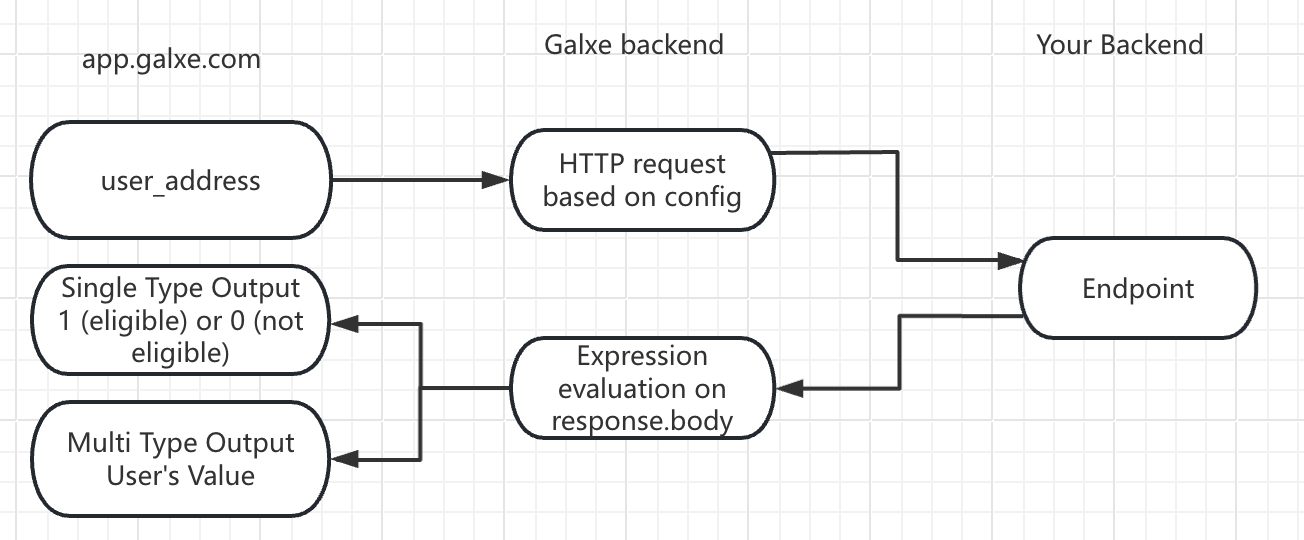 1. **app.galxe.com**: When a user clicks "Verify" on a Quest page, Galxe sends the user's wallet address, social media information, or other selected **id type** as an input parameter.
2. **Galxe Backend**: Based on the pre-configuration, Galxe sends an HTTP request and query containing the wallet address to your `REST API` and waits for the response.
3. **Your Backend**: After receiving the HTTP request from Galxe, your backend processes the request and returns the response data related to the wallet address.
4. **Galxe Backend**: Processes the `response.body` from your backend using predefined expressions to determine if the user meets the conditions.
`35.185.209.0` and `35.203.155.18` are our outbound IPs. Failure to whitelist these may result in 403 errors when accessing the service.
***
### **Configuration Requirements**
*What is required for setting up a task using a REST credential.*
**API Specification**
* **Endpoint**:
The URL of the `REST` endpoint.
We only support the default ports for HTTP and HTTPS (80 and 443).
* **(Optional) Headers**:
`Key-value` pairs included in the `REST` request.
**Parameter Mapping (Placeholders)**
* `$address`: Replaced with the user's wallet address as a hexadecimal string with the `0x` prefix, e.g., **`0x95ad73...`**.
* `$addressWithout0x`: Replaced with the user's wallet address as a hexadecimal string without the `0x` prefix, e.g., **`95ad73...`**, typically used for constructing **`eth_call`** requests.
* `$socialId`: Used when user information is not an address (email or Telegram ID) and replaced with the respective information.
For addresses encoded in case-insensitive formats (EVM or Aptos addresses starting with `0x`), Galxe converts them to lowercase before sending to your endpoint.
***
### **Data Format**
Galxe supports **JSON body format** exclusively for both `GET` and `POST` responses.
```json theme={null}
{
"key": "value"
}
```
Galxe requires requests to respond within 5 seconds; otherwise, the request will be canceled.
***
### **Expression**
**Function Requirements**
1. Write an anonymous `JavaScript (ES6)` function with the type signature `(object) => int`.
2. The function takes the entire response object `resp` as a parameter.
3. It must return the number `1` or `0`, indicating whether the address qualifies for the credential.
Do not return Boolean values (`true/false`) or strings (`"0"/"1"`).
**Anonymous Function Format**
The function must be `anonymous`, with the first line written in the following format:
```javascript theme={null}
function(resp) {
/* Function body */
}
```
To ensure a more secure `function`, always validate the structure of the `resp` object before accessing its properties,
this helps prevent errors or unexpected behavior when the API response is incomplete or incorrectly formatted.
### **Security and Authorization**
When configuring the `REST API`, you can achieve secure access through request headers (such as `API KEY` or `tokens`). This information will not be exposed by Galxe, and only users with Space admin privileges can view it.
You should still be careful not to embed other private information in the expression encoding, as this will be made public.
### **CORS**
Galxe's API calls are not made through the browser but via backend servers. Although this avoids triggering browser CORS restrictions, we still send preflight `OPTIONS` requests during API configuration to validate the API's correctness. This process does not adhere to the [Simple Request Convention](https://developer.mozilla.org/en-US/docs/Web/HTTP/CORS#simple_requests).
For more information, visit [CORS Check](/quest/credential-api/overview/cross-domain-check).
1. **app.galxe.com**: When a user clicks "Verify" on a Quest page, Galxe sends the user's wallet address, social media information, or other selected **id type** as an input parameter.
2. **Galxe Backend**: Based on the pre-configuration, Galxe sends an HTTP request and query containing the wallet address to your `REST API` and waits for the response.
3. **Your Backend**: After receiving the HTTP request from Galxe, your backend processes the request and returns the response data related to the wallet address.
4. **Galxe Backend**: Processes the `response.body` from your backend using predefined expressions to determine if the user meets the conditions.
`35.185.209.0` and `35.203.155.18` are our outbound IPs. Failure to whitelist these may result in 403 errors when accessing the service.
***
### **Configuration Requirements**
*What is required for setting up a task using a REST credential.*
**API Specification**
* **Endpoint**:
The URL of the `REST` endpoint.
We only support the default ports for HTTP and HTTPS (80 and 443).
* **(Optional) Headers**:
`Key-value` pairs included in the `REST` request.
**Parameter Mapping (Placeholders)**
* `$address`: Replaced with the user's wallet address as a hexadecimal string with the `0x` prefix, e.g., **`0x95ad73...`**.
* `$addressWithout0x`: Replaced with the user's wallet address as a hexadecimal string without the `0x` prefix, e.g., **`95ad73...`**, typically used for constructing **`eth_call`** requests.
* `$socialId`: Used when user information is not an address (email or Telegram ID) and replaced with the respective information.
For addresses encoded in case-insensitive formats (EVM or Aptos addresses starting with `0x`), Galxe converts them to lowercase before sending to your endpoint.
***
### **Data Format**
Galxe supports **JSON body format** exclusively for both `GET` and `POST` responses.
```json theme={null}
{
"key": "value"
}
```
Galxe requires requests to respond within 5 seconds; otherwise, the request will be canceled.
***
### **Expression**
**Function Requirements**
1. Write an anonymous `JavaScript (ES6)` function with the type signature `(object) => int`.
2. The function takes the entire response object `resp` as a parameter.
3. It must return the number `1` or `0`, indicating whether the address qualifies for the credential.
Do not return Boolean values (`true/false`) or strings (`"0"/"1"`).
**Anonymous Function Format**
The function must be `anonymous`, with the first line written in the following format:
```javascript theme={null}
function(resp) {
/* Function body */
}
```
To ensure a more secure `function`, always validate the structure of the `resp` object before accessing its properties,
this helps prevent errors or unexpected behavior when the API response is incomplete or incorrectly formatted.
### **Security and Authorization**
When configuring the `REST API`, you can achieve secure access through request headers (such as `API KEY` or `tokens`). This information will not be exposed by Galxe, and only users with Space admin privileges can view it.
You should still be careful not to embed other private information in the expression encoding, as this will be made public.
### **CORS**
Galxe's API calls are not made through the browser but via backend servers. Although this avoids triggering browser CORS restrictions, we still send preflight `OPTIONS` requests during API configuration to validate the API's correctness. This process does not adhere to the [Simple Request Convention](https://developer.mozilla.org/en-US/docs/Web/HTTP/CORS#simple_requests).
For more information, visit [CORS Check](/quest/credential-api/overview/cross-domain-check).